
SCADA Open Platform

Capability 01 · SCADA

Every screen of the plant, from one database.

Synoptics, faceplates, alarms, trends and the record, drawn once and served on the wall, the desk and the phone. And the line's own edge keeps serving them when the centre cannot.

Everything a SCADA does, it does:

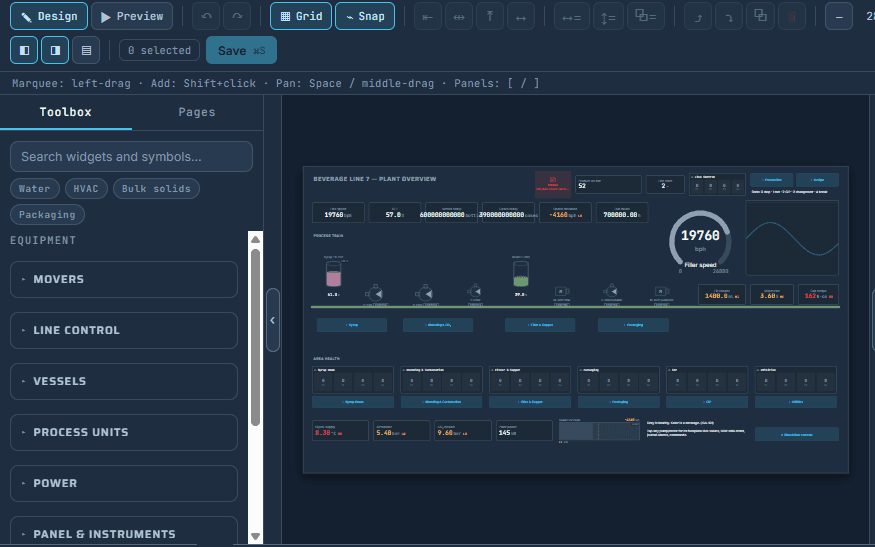
the page designer · Beverage Line 7 · Preview
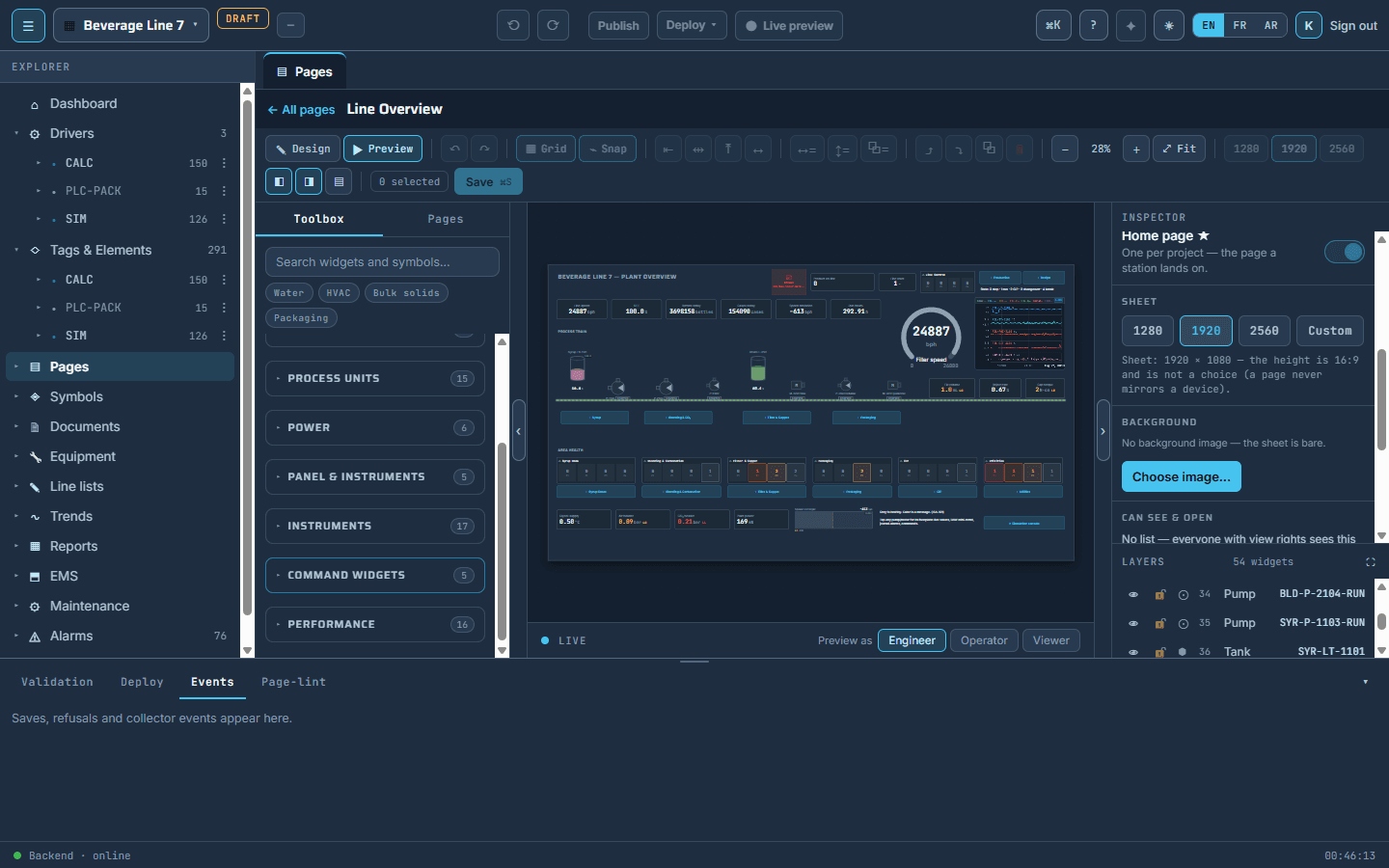
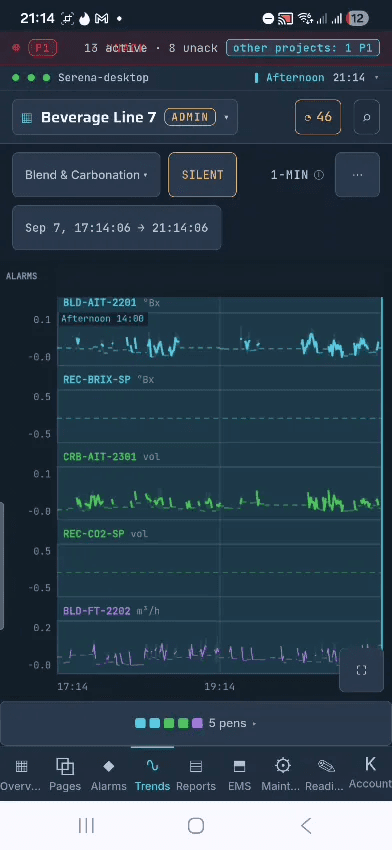
The page designer in Preview: the operator's own screen on the plant's real values, while the work is still being done — and the same pages in the hand, on a phone
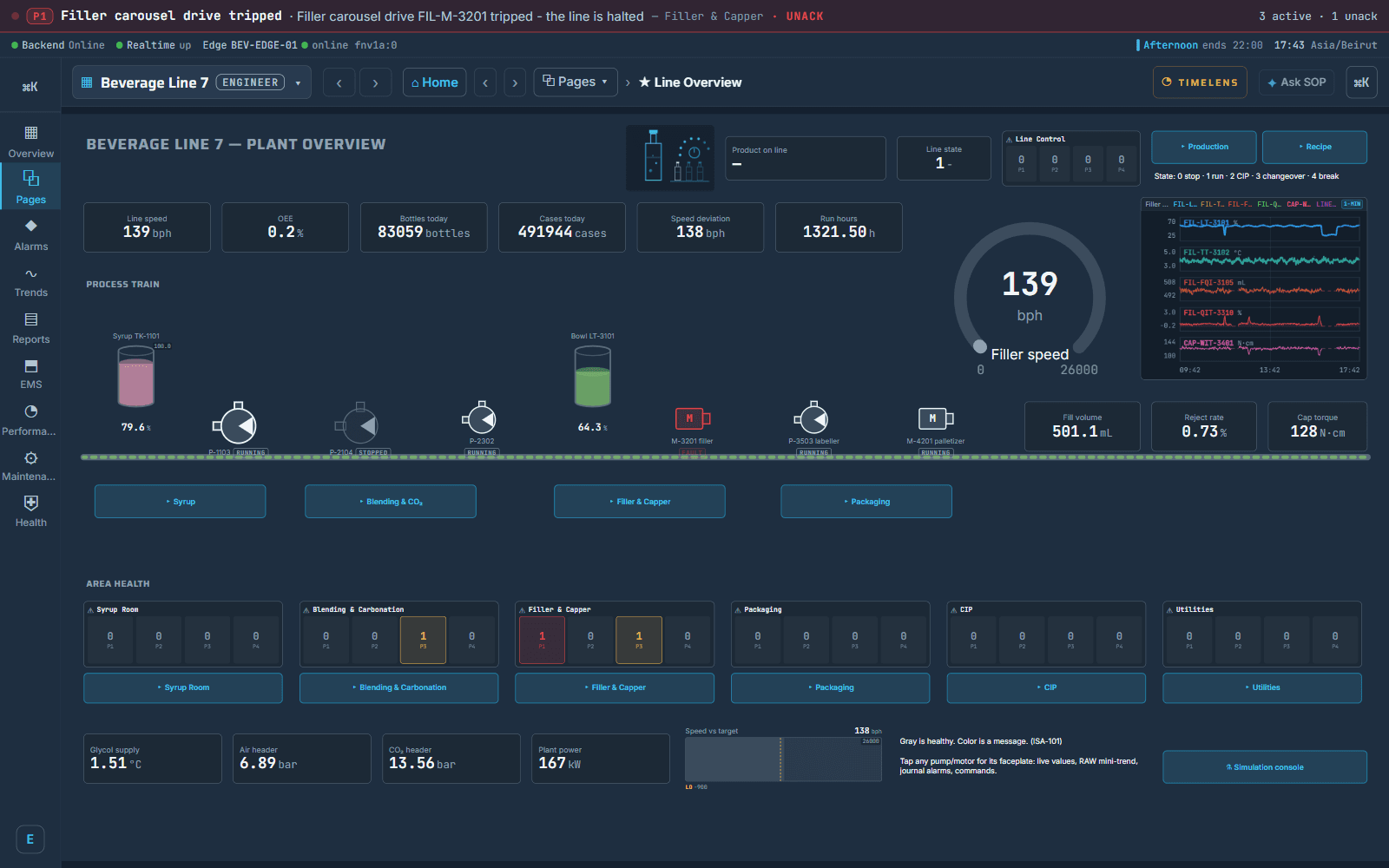
the line overview on a phone: the KPI tiles and the mini synoptica trend on a phone
The page designer in Preview: the operator's own screen on the plant's real values, while the work is still being done — and the same pages in the hand, on a phone
  1. Synopticsthe whole line at a glance on one synoptic, live, on the wall panel, the desk and the phone
  2. Machinesa faceplate on every machine: its values, a small trend, its alarms, its causes, its commands and its documents
  3. Commandsattributed, timestamped, and refused in the database when the person may not
  4. Alarmsprioritised, acknowledged by name, shelved with a reason and a return time; the journal that keeps every one; the insights ISA-18.2 and EEMUA 191 ask for — the rate against its target, the response times, the flood episodes, the alarms that raise most; the shift handover sheet
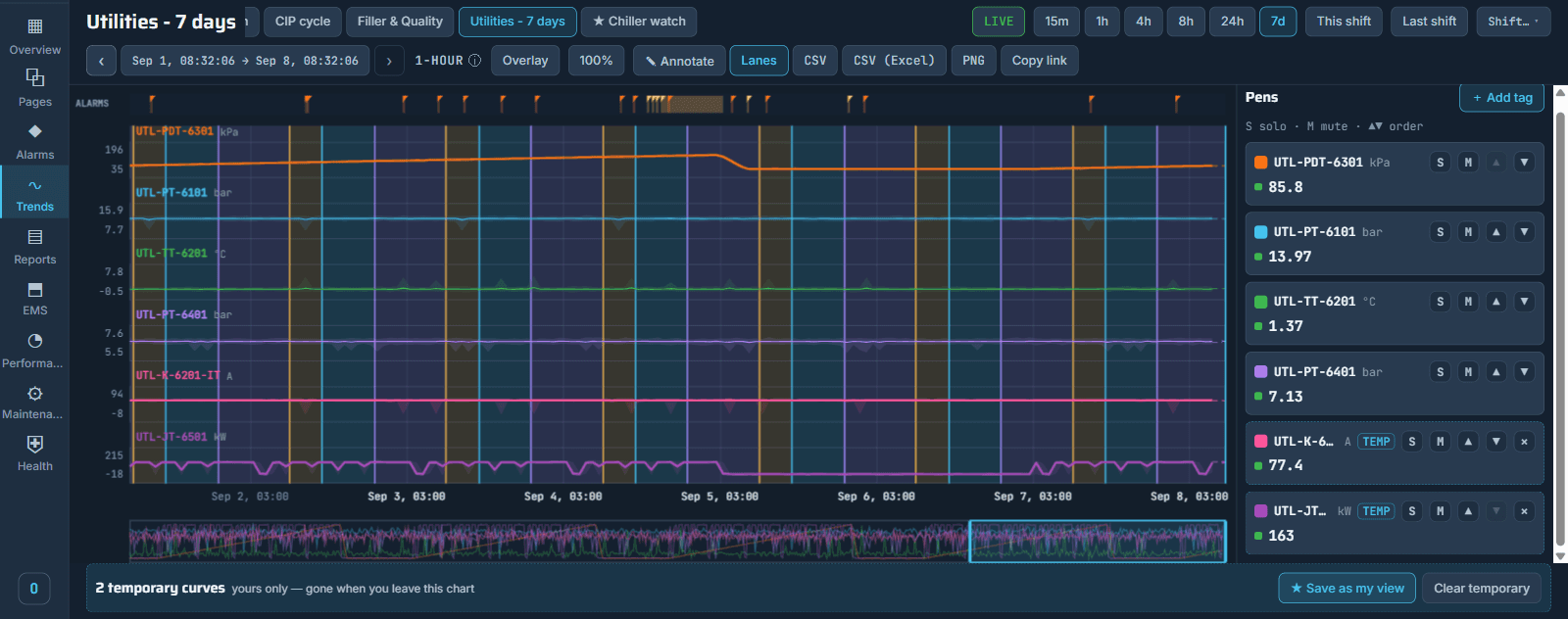
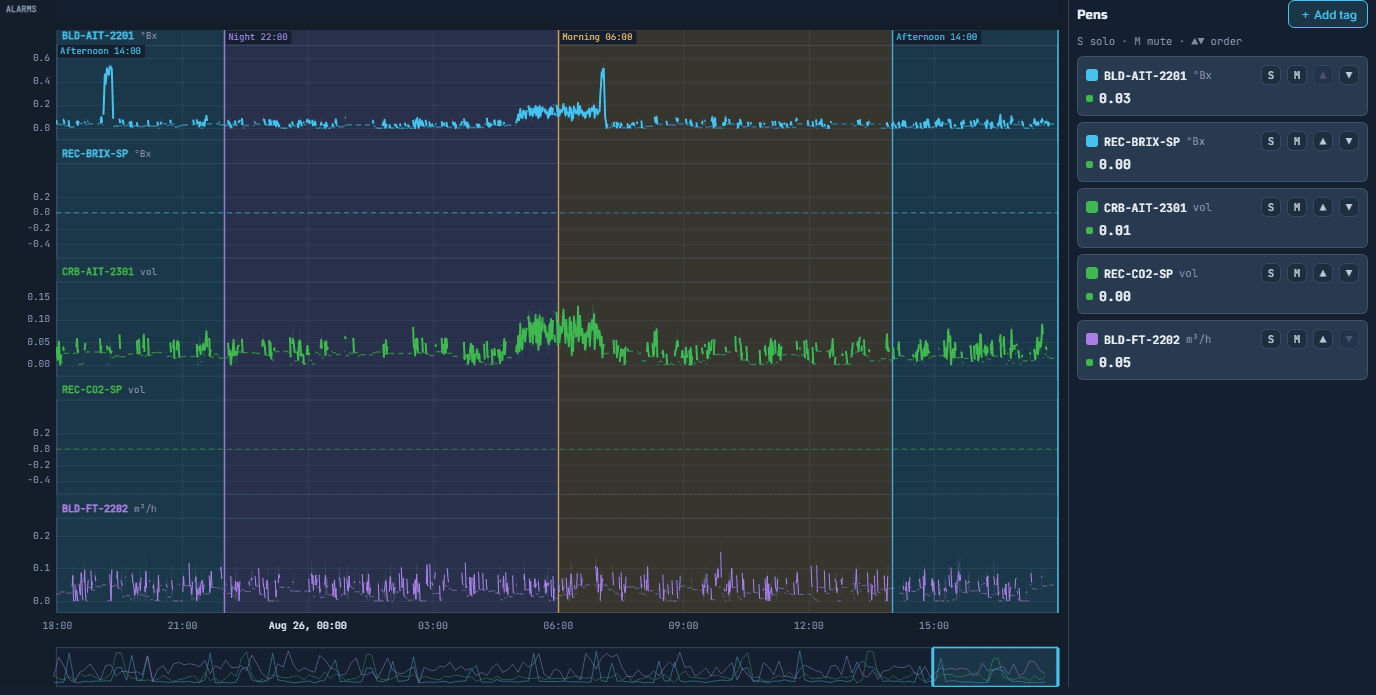
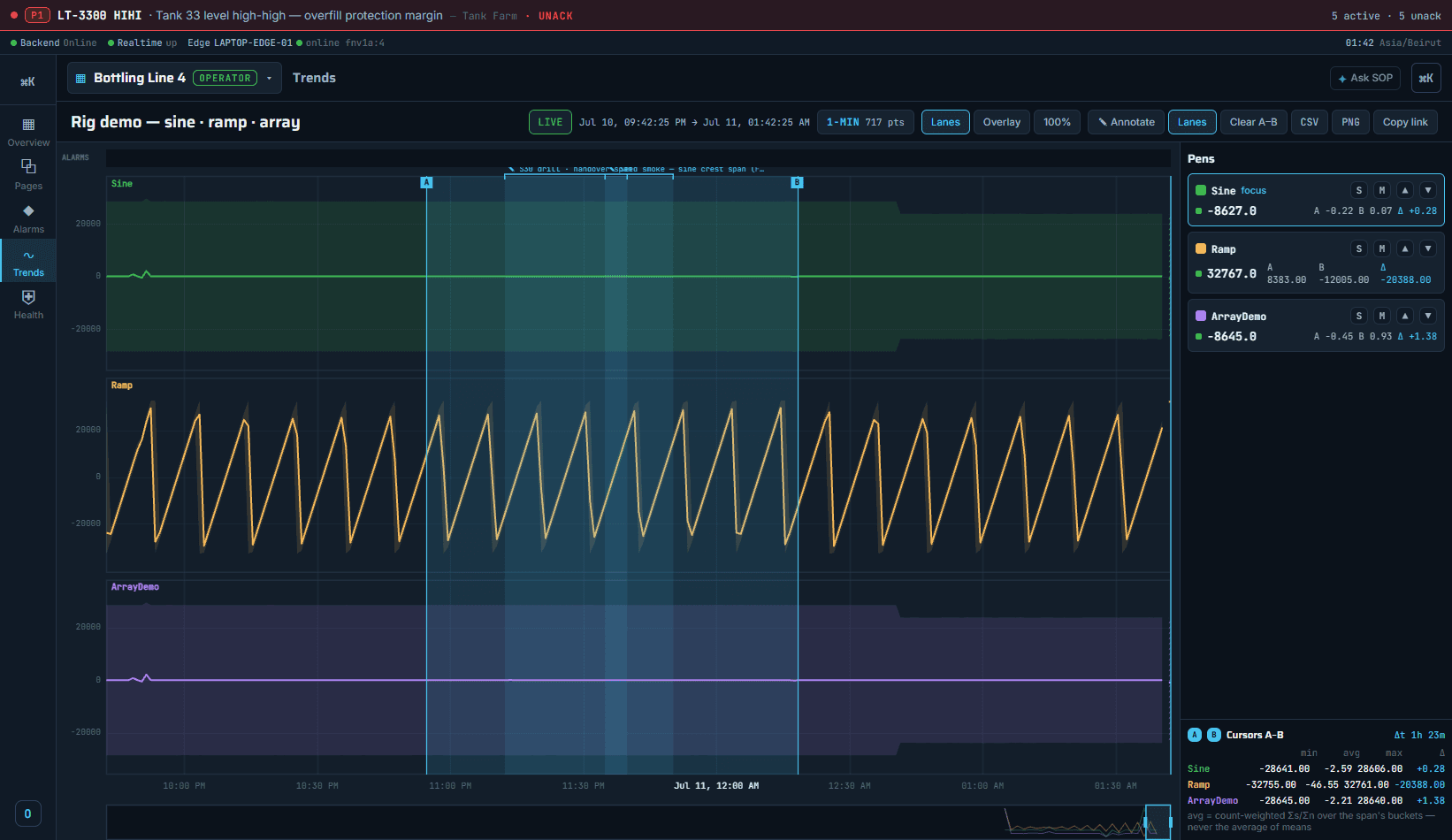
  5. Trendstwo cursors and the numbers across the span; shift-aware windows on the plant's clock; annotations that stay with your name and the time; a stamped export; a link that opens the same window for a colleague
  6. Historyevery reading kept; a month of a slow signal drawn as fast as an hour
  7. Engineeringa browser editor with live preview against the running line; a symbol library by equipment family; a line travels to the next plant as one file
  8. Rights and recordusers, groups and rights down to one page, one signal, one module; the audit journal across the fleet
  9. Languages and panelsthree languages, right to left included; the pinned panel that shows one line and nothing else
  10. Drivers and serversthe drivers a plant needs — Modbus, OPC DA, Siemens S7 and OPC UA among them; duty and standby servers

Everything it does, in one glance

  • You want
  • What SOP does
  • Where it is
You wantWhat SOP doesWhere it is
the whole line at a glanceone synoptic drawn once and served on every screen, livethe HMI, the line overview
to look inside one machinea faceplate on the machine itself: its values, a small trend, its own alarms, its causes, its commands and its documentstap the pump or the valve on the page
to start, stop or set a valuea command that is attributed, timestamped, and refused in the database when the person may notthe command widgets on the page
a panel that shows one line and nothing elsethe panel is pinned to that line and cannot wanderthe station, set once by the administrator
the plant's own languagethe same pages in three languages, right to left included, chosen per personthe account menu, and the page's own names
to know an alarm the moment it raisesprioritised alarms with the rate against its target and the standing countthe HMI, alarms
to park a nuisance alarm honestlyit is shelved with a reason and a return time, and everyone can see boththe alarm's own card
the screen as it was when the alarm came inone press from the alarm to that page at that momentView in TimeLens, on the alarm card
to compare two signals over a shiftlanes or one lane, two cursors, and the numbers across the spanthe HMI, trends
to send a colleague exactly this viewa link that opens the same window and the same pensthe trend's copy link
to draw or change a screena browser editor with live preview against the running linethe editor, pages
to know what a tag touches before changing itevery page, trend, alarm, report block, formula and condition that uses itthe editor, the Tag Lens
to move a line to the next plantduplicate it in one press, or carry it as one portable filethe editor, the project card
the plant to keep running when the server does notthe edge serves the plant's real pages on the LAN, and a standby server takes the address when the duty stopsthe line's own edge; the config console, the servers
the datasheet, standing at the machinethe documents attached to the machine open over the page, the others beside themthe machine's own door, its documents
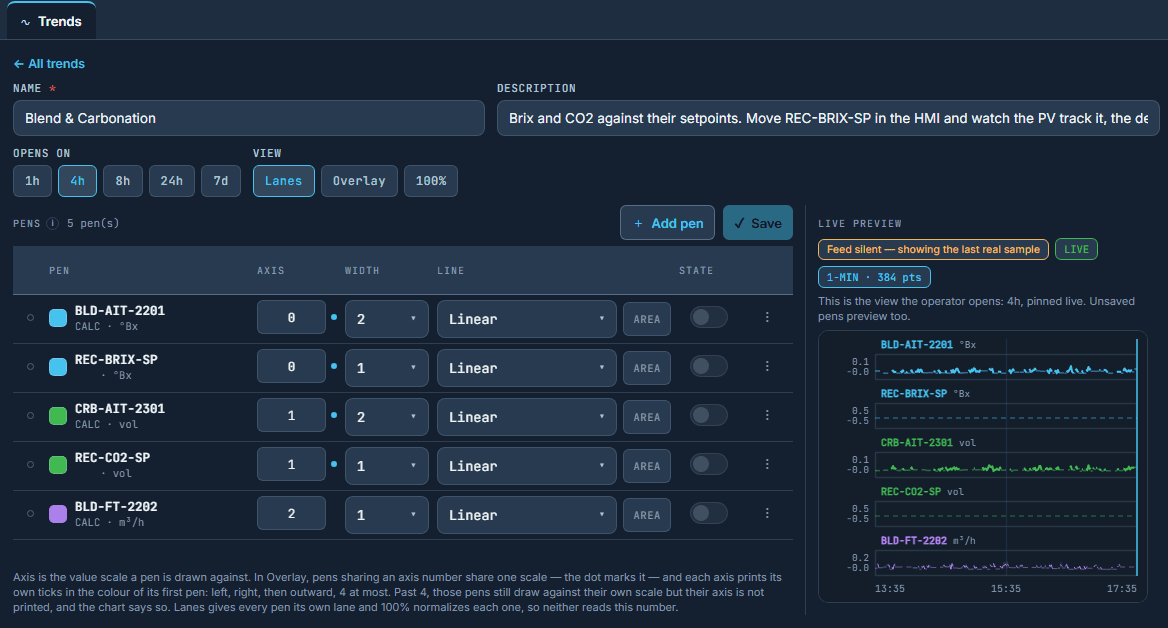
a signal that is on nobody's chartadd it yourself; it draws beside the saved curves and the star keeps it for your next shiftthe trend's Add tag and Save as my view
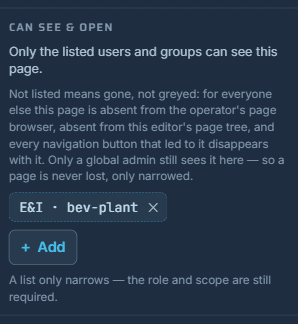
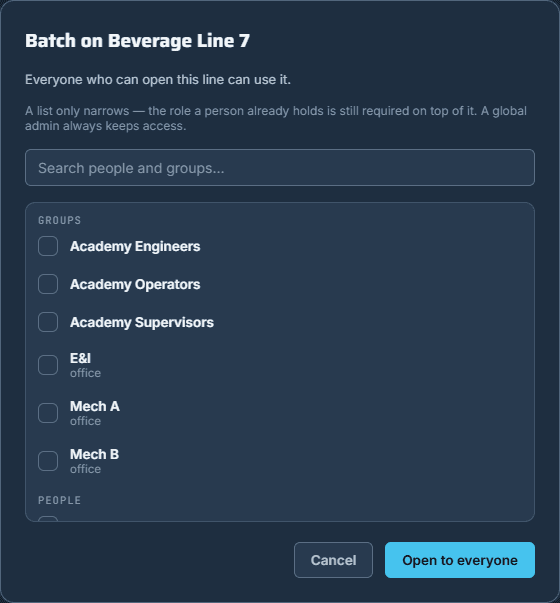
one crew to see one set of screens, one module, one valvea list on the page, the module or the signal; off the list a page goes away, not greythe editor's Can see and open, the console's module access
to answer an auditor about Tuesdayevery command, acknowledgement, shelving and grant across the fleet, narrowed and exportedthe config console, the audit journal

Nothing on this page is a module you buy later. It is what the SCADA is.

01/10

Synoptics, every screen

One page, every screen it is opened on.

the HMI · Beverage Line 7 · the line overview
the live line overview: the process train, the day's counters, area health and the alarm banner
  1. One synoptic, every screenOne page drawn once, served live on the wall panel, the desk and the phone; nothing installed, nothing licensed per screen.
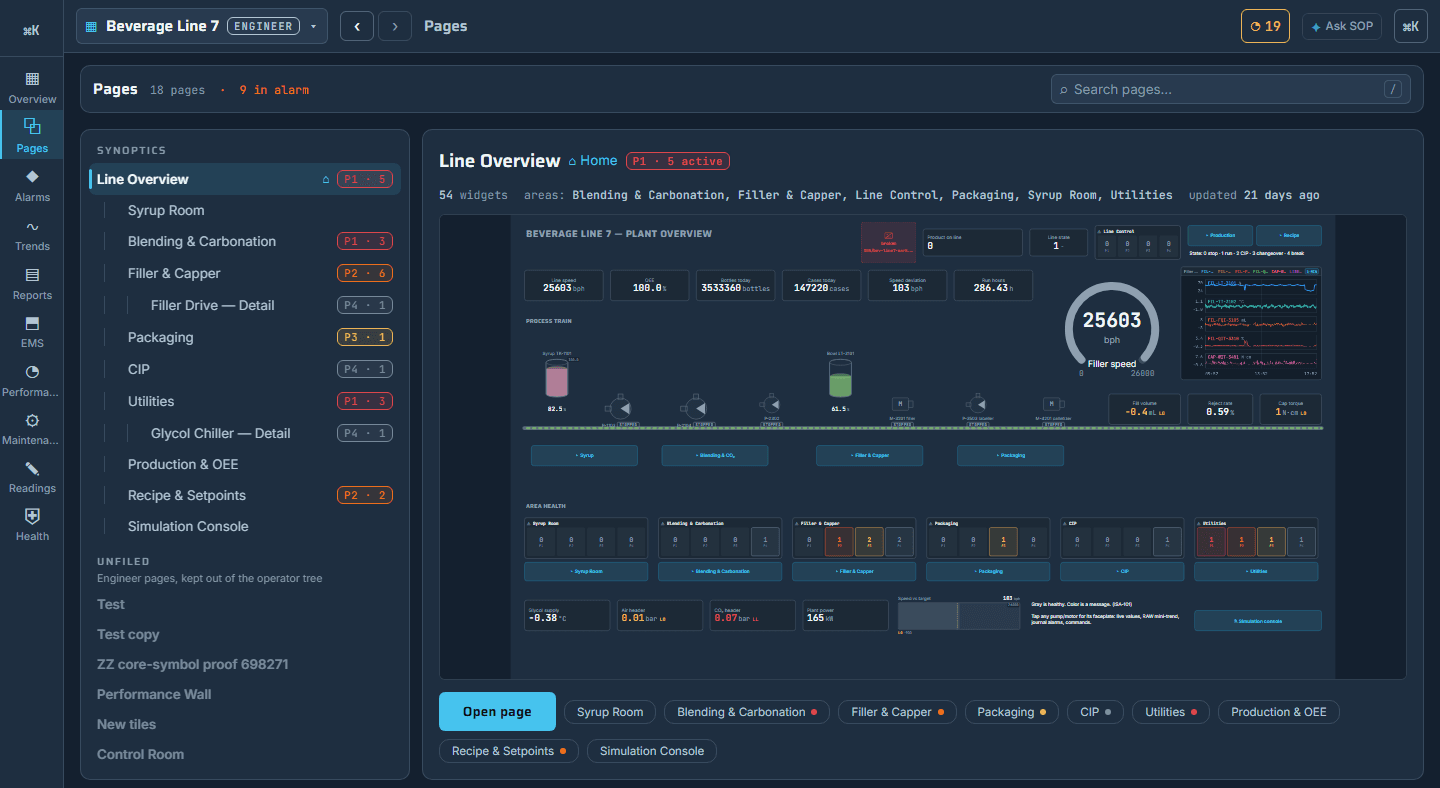
  2. The page tree, drawn liveThe operator's pages in plant order, the page itself drawn live beside the tree, not a thumbnail.
  3. Alarm pressure before openingLive values, the state of every machine and the alarm pressure on a page before it is opened.
  4. Command widget, two-step confirmA press on a writable signal that is attributed, timestamped, and refused in the database when the person may not.
  5. The pinned panelA panel that opens on one line's home page and cannot be navigated away.
  6. Three languages, per personThe same pages in three languages, right to left included, chosen per person and not per site.
  7. Quality on every readingA stale or bad value is dressed as stale or bad, never drawn as a fresh number.

Seen in the product

the operator's page tree in plant order, with the page itself drawn live beside it, not a thumbnail
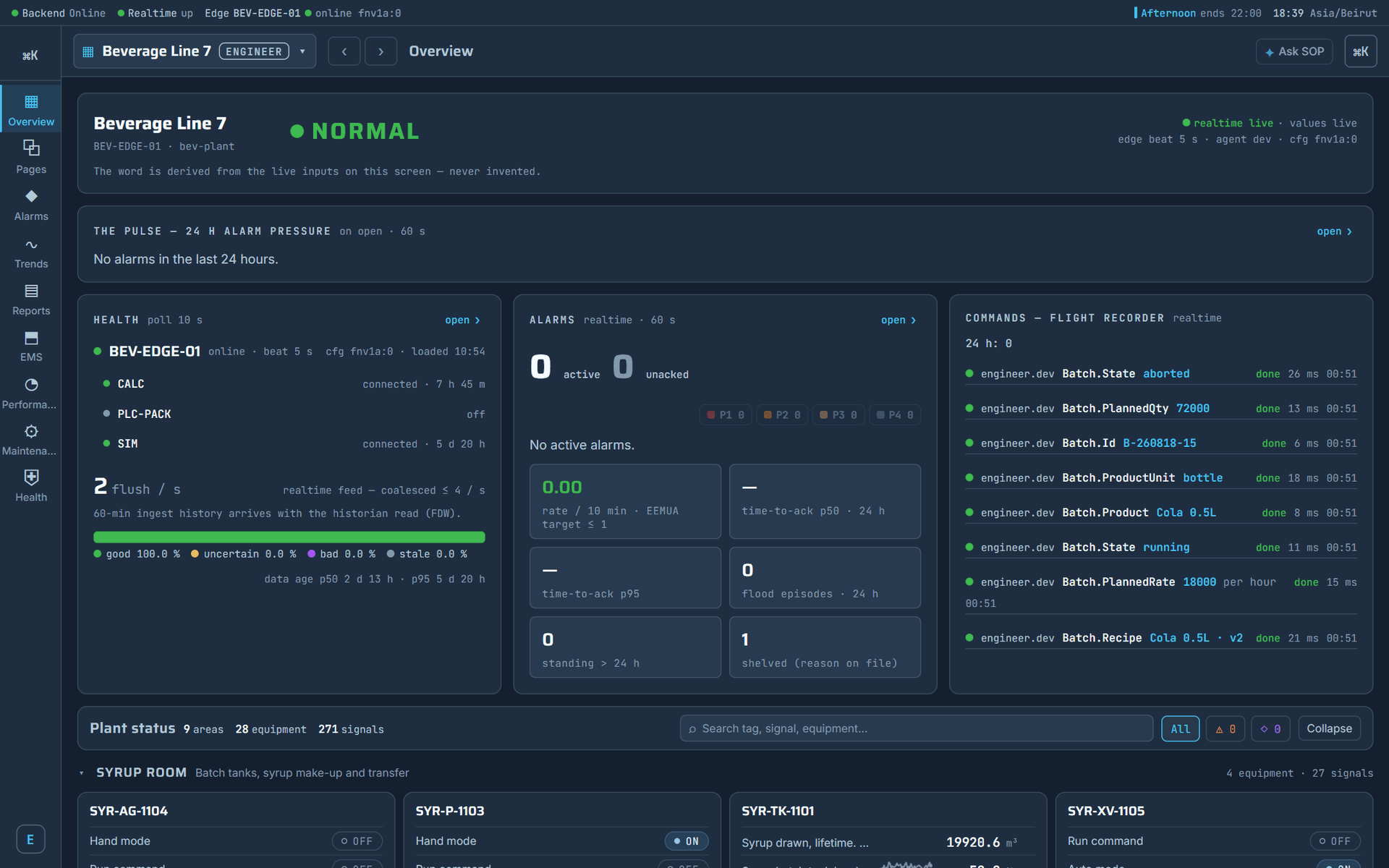
the Overview the operator opens on: the state, the day's alarm pressure, the health of the edge and its drivers, the commands as they were sent

One page, every screen it is opened on.

  • The operator's screens are drawn once and served everywhere, from the wall panel to a phone, with nothing installed and nothing licensed per screen. Values, states, alarms and commands sit on the same page, in the language the person reading it chose.
  • A page is never redrawn for a second screen size: the wall panel, the desk and the phone all serve the same page.
02/10

Machines and their documents

Every machine carries its own door, and its documents.

the machine's door · Beverage Line 7 · the transfer pump
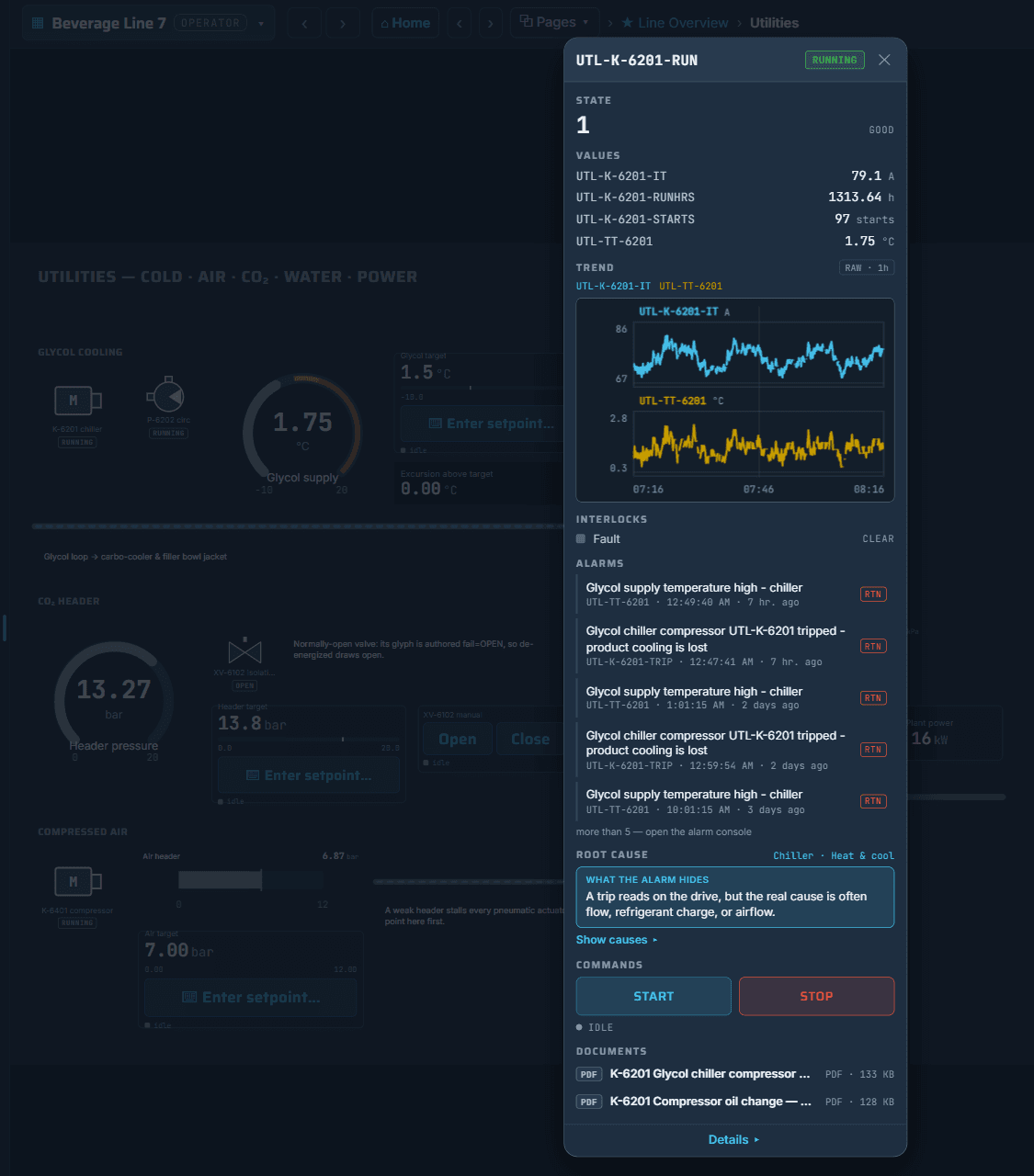
the machine's own door on a running line: its state, its readings, its own alarms, the causes its type carries, and its buttons
  1. The machine's own doorOne door on the machine: its values, a small trend, its own alarms, its causes, its commands and its documents.
  2. Readings with their trustThe machine's state, its readings, and how far each one can be trusted.
  3. Interlocks, then alarms under themThe machine's own bits, and separately what the alarm system recorded against it, never one posing as the other.
  4. The small trend inside the doorThat machine's own readings over a short window, on the raw values, so a spike is still a spike.
  5. Causes the machine's type carriesThe mechanical, electrical and process causes for that kind of machine, and one line naming what the alarm hides.
  6. Buttons inside the doorStart or stop without leaving the machine: two-step confirm, then a press attributed, timestamped and refused when the person may not.
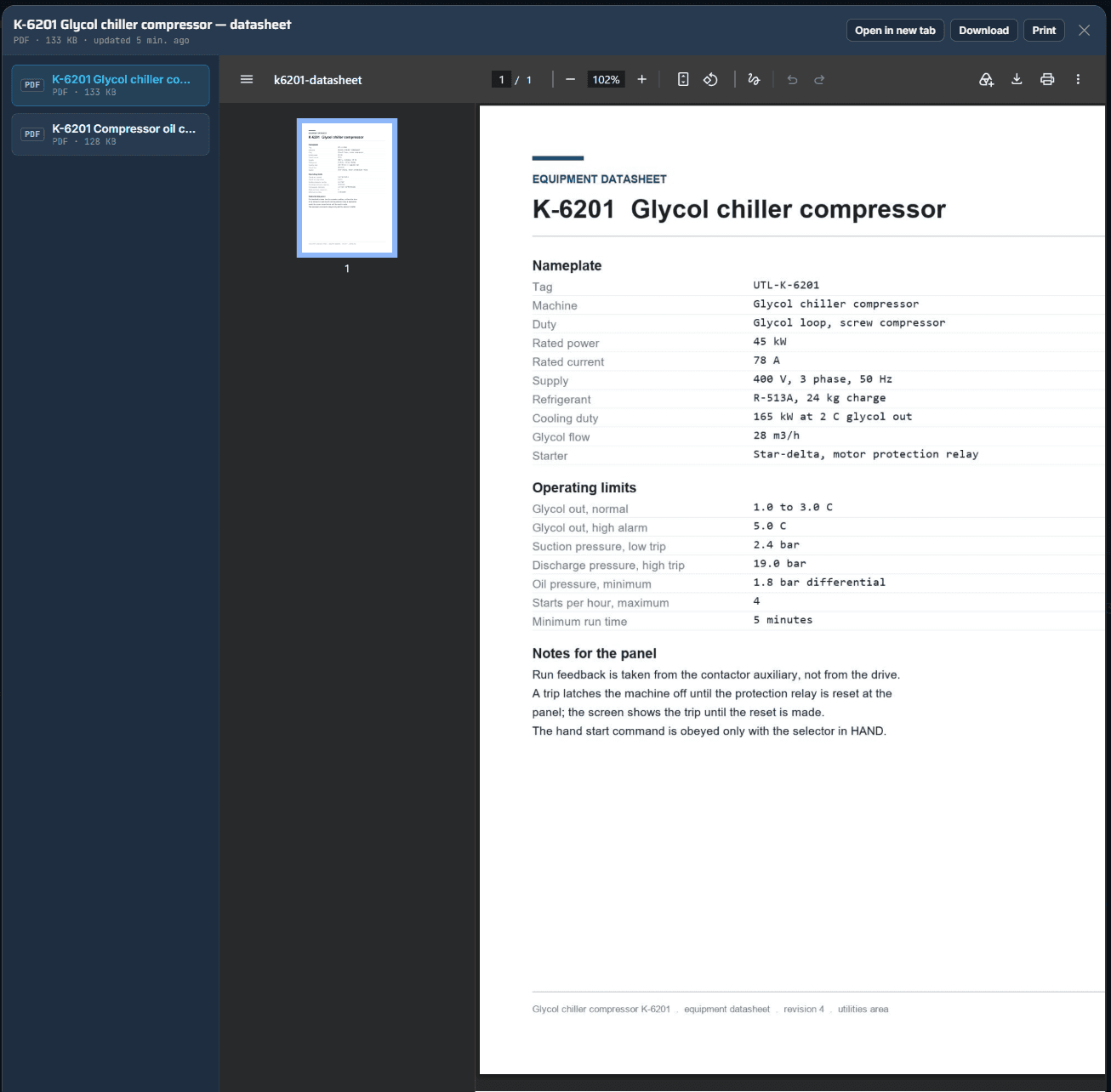
  7. Documents at the machineThe sheet opens over the page with the others beside it, nothing to search for and nothing to download first.
  8. Details — the machine's full pageThat machine's full page opens, in the same window.

Put the paper in once. It opens at the machine.

the editor · Beverage Line 7 · the document library
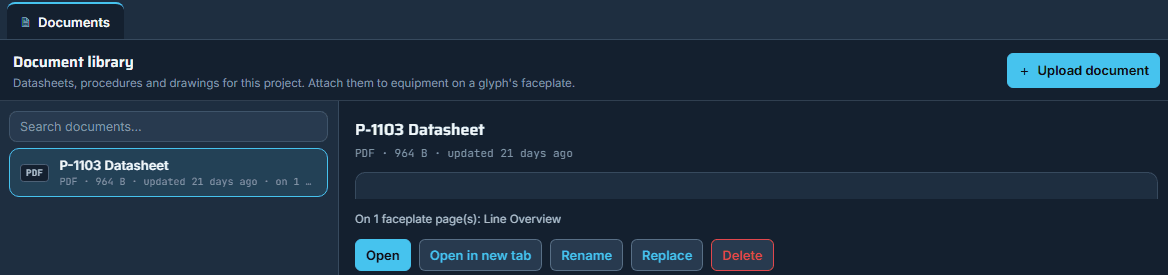
the line's document library: what is in it, which pages carry each one, and the press that swaps a revision
  1. One line, one document libraryThe drawings, the datasheets and the procedures that came with the machines, put in once by an engineer with design rights on the line.
  2. Documents follow the page's rightsEveryone who can open the page the machine sits on sees it; the file stays in the plant's private store, handed out one view at a time.
  3. A new revision, no page redrawnReplace the file in the library and every machine that carries it shows the new one.
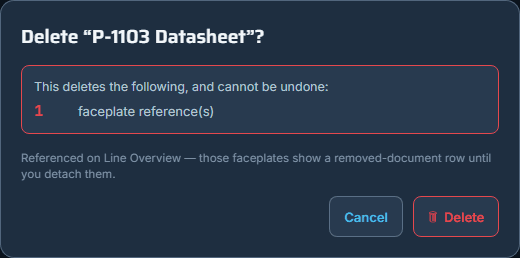
  4. Nothing removed blindThe library names every page still carrying a document, and counts them, before it lets go.
  5. Documents travel with the lineCopy the line and its documents copy with it; carry the line to the next plant as one file and the documents ride inside it.

Seen in the product

the datasheet opened from the machine's own door, with the other documents beside it
nothing is removed blind: the library names the pages that still carry it

Every machine carries its own door, and its documents.

  • An operator who presses a pump on the page gets the machine itself: what it is doing now, what it has been doing, what the alarm system has recorded against it, and the buttons that move it. Behind the same door sits the plant's own paper, put into the line once and opened at the machine that needs it.
  • The fault light on the machine and the alarms under it are two different things: a pump can sit with its fault bit clear and three unanswered alarms in the journal, so the door shows both, separately.
  • One line, one document library: the drawings, the datasheets and the procedures that came with its machines. An engineer puts a file in once, and it opens at the machine, for everyone who can open the page that machine sits on.
  • The paper is part of the line: it is one press from the pump, and it goes wherever the line goes.
03/10

Alarms

An alarm is an event with a record.

the HMI · Beverage Line 7 · alarms
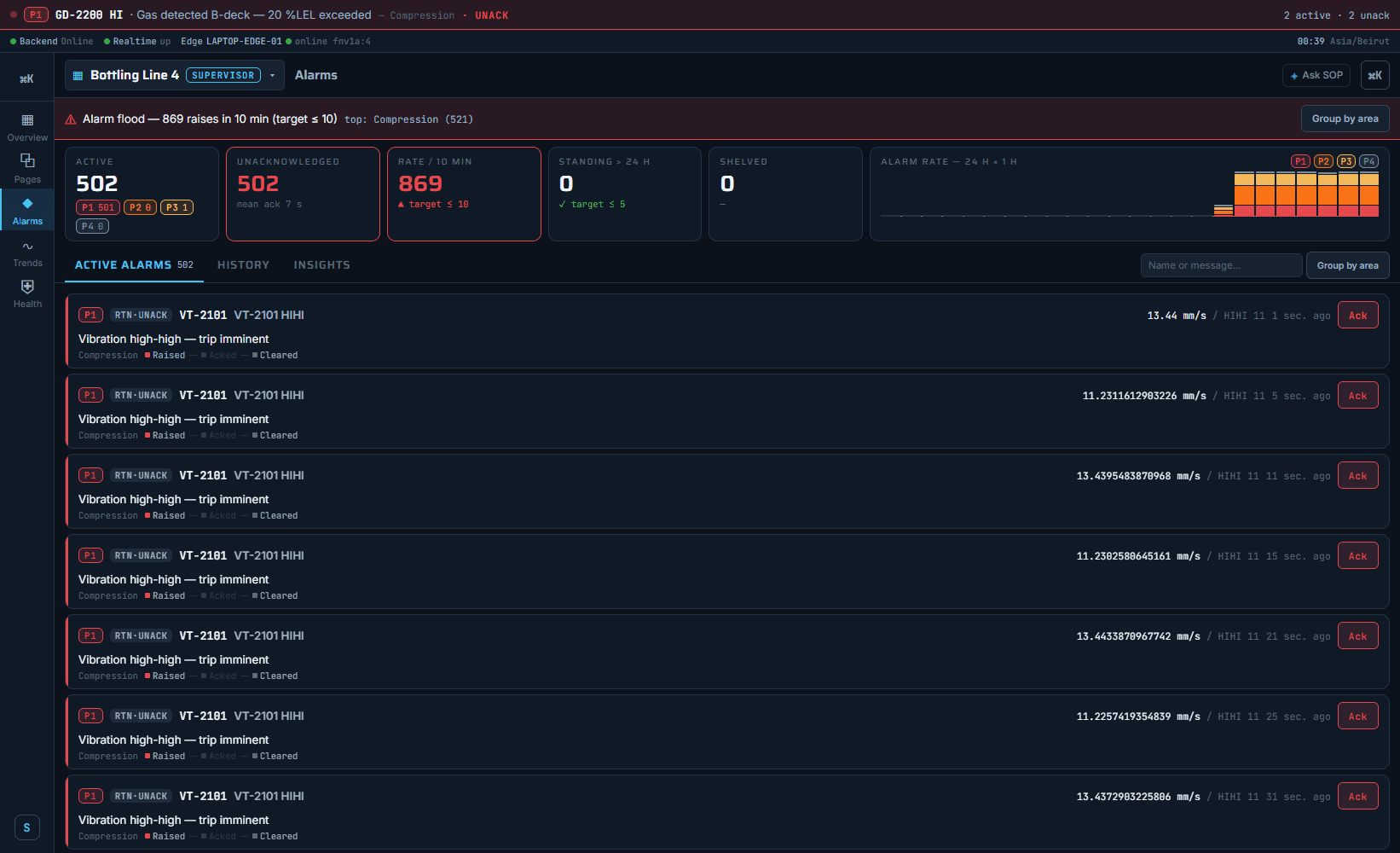
the alarm console under a flood: the rate against its target, what is standing, what is shelved
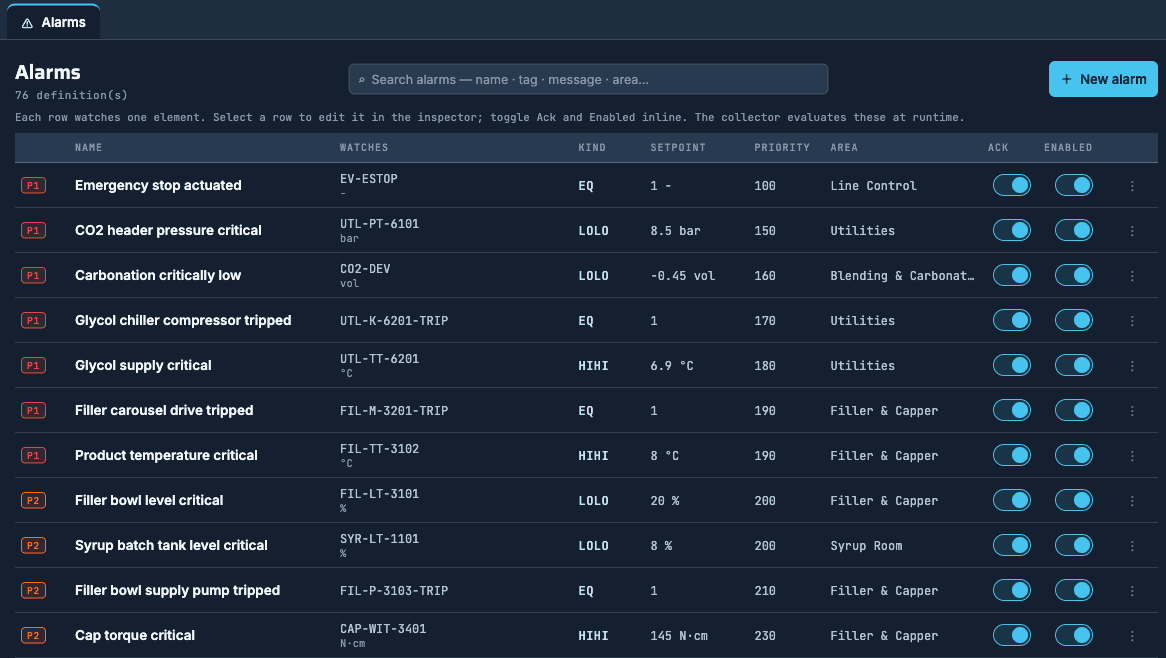
  1. Write the alarm rule onceSignal, limit, how long it must hold, how urgent; the edge beside the machine starts judging it within seconds, with no deploy step and no restart.
  2. Prioritised alarms, rate and standing countThe board shows what is standing, the rate against its target, and what is shelved.
  3. Acknowledge by name, with a noteThe name, the moment and the note enter the record, and every open screen shows it at once.
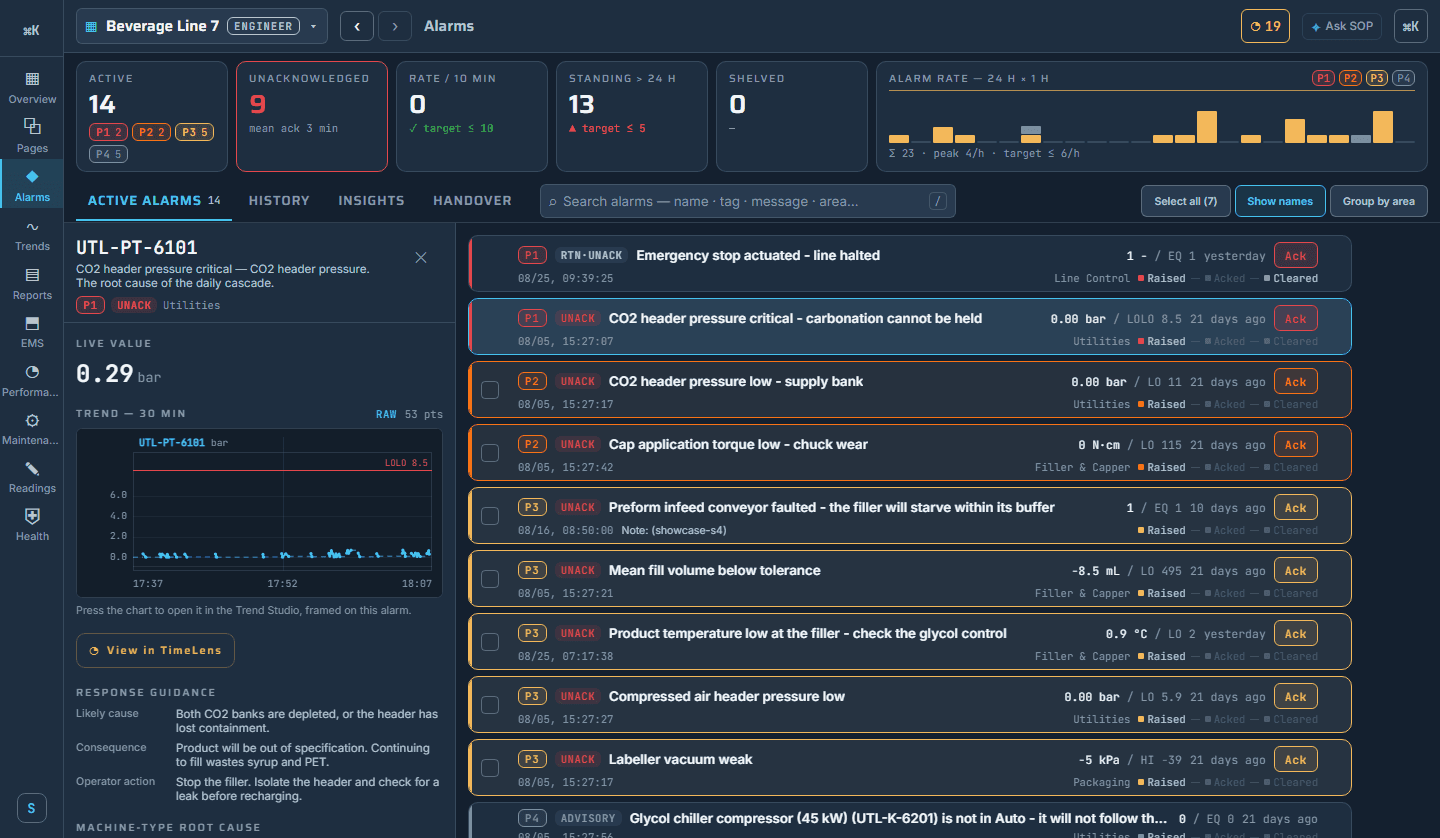
  4. The card's guidanceThe live value, the half hour before it against its limit, and the cause, the consequence and the action the engineer wrote.
  5. Bulk acknowledge with one reasonOne entry per alarm carrying that reason, and the most critical band held back to be answered one at a time.
  6. Shelve with a reason and a return timeA nuisance alarm leaves the board for a bounded time, everyone sees why and until when, and it comes back by itself.
  7. Alarm insightsThe response times, the flood episodes and the alarms that raise most — the insights ISA-18.2 and EEMUA 191 ask for.
  8. A journal that survives the ruleSwitch a rule off, repoint or delete it, and every alarm it raised stays in the journal, each saying why it ended.
  9. Shift handoverWhat was still standing and still unanswered at the boundary, with the outgoing supervisor's note and signature.
  10. View in TimeLens from an alarmOne press from the alarm to that page at that moment.

Seen in the product

the alarm on its own card: the live value, the half hour against its limit, the guidance — and View in TimeLens
the rules behind it: the editor's alarm list on a real line, one row per rule

An alarm is an event with a record.

  • An engineer writes the rule once, the edge beside the machine judges it, and the person who answers leaves their name on the record. The board, the journal, the numbers and the printed sheet all read the same rows, so an alarm cannot mean one thing on a screen and another on paper.
  • The same event carries the rule that judged it, the person who answered it, the screen it belonged to and the sheet it is printed on, with no second product under any of them.
  • Switch a rule off, point it at another signal or delete it altogether, and every alarm it already raised stays in the journal, each one saying in its own words why it ended.
05/10

Historian

The history is part of the platform, not a product beside it.

the editor · Beverage Line 7 · the trend designer
the chart being built, drawing as it is typed, on real history
  1. The plant and its history, one boxThe plant and its history stand on the same box, never two systems to reconcile.
  2. Not a product beside the SCADAIn the class the history chart is a product beside the SCADA, with its own licence and its own seat; here it is the same database the screen is already drawing from, and every operator already has it.
  3. Averages that survive an auditAverages are count-weighted, never an average of averages.
  4. A quality byte on every readingA quality byte rides every reading, so a number the plant should not trust says so.
  5. A correction walks forwardCorrect a value from years ago and every total since corrects itself — there is no second copy to migrate.
  6. Any window, and it names the resolutionA month of a slow signal draws as fast as a short window, and the chart names the resolution it answered from.
  7. The gap fills itself inCut the network and the readings wait on the edge's own disk, then fill the gap in.
  8. One key, register to sheetOne key follows a signal from the controller's register to the pixel, the trend, the batch, the work order and the printed sheet.
  9. The history is inside the licenceThe database and the historian are what the licence already contains, with every project drawn, duplicated and exported.

One database. One history.

  • One database, Postgres; one historian beside it, TimescaleDB; the plant and its history on the same box — dozens of lines, every reading, on two servers. Nothing in the stack is sunsetting.
  • Ask for a month of a slow signal and it draws as fast as a short window — and the chart names the resolution it used.
  • Nothing is mapped a second time. One key follows a signal from the register to the pixel, the trend, the batch, the work order and the printed sheet.
06/10

The editor, live

Engineered in a browser. Travels as one file.

the page designer · Beverage Line 7 · the toolbox
the toolbox by equipment family beside the canvas
  1. A browser editor, nothing per workstationEngineers draw in a browser; nothing is licensed per workstation.
  2. Two engineers, one pageEach sees the other is there, and a stale save is refused rather than quietly merged.
  3. Symbols that know the machineA curated library by equipment family, each body drawn to process scale and carrying the failure words the maintenance record picks from.
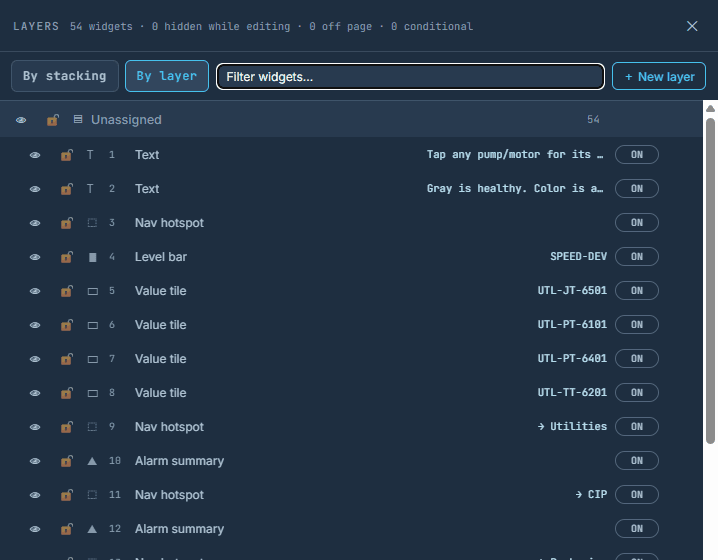
  4. Layers, and the eyeThe engineer declutters for himself without taking anything off the operator's page.
  5. A widget shown by a plant conditionIt appears when the plant says so, and stays visible when the signal cannot speak.
  6. Duplicate the lineEvery binding, target and attached document follows, with fresh identities.
  7. The line as one portable fileExport it, import it at the next plant: names travel and identities do not, so nothing can collide with what is already there.

The engineer builds against the running line.

the page designer · Beverage Line 7 · Preview
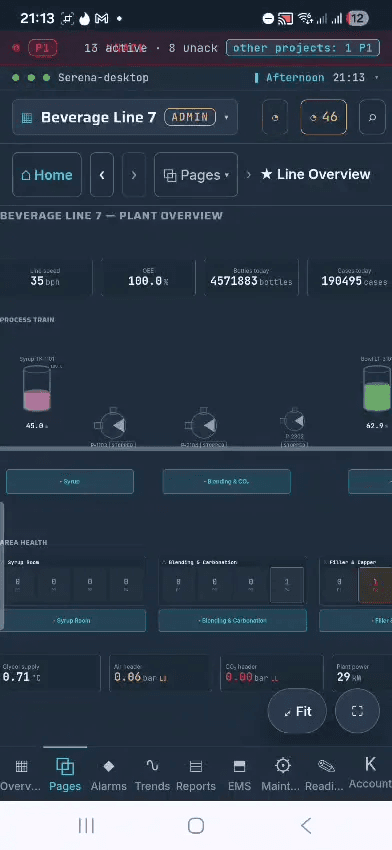
the same page in preview: the operator's line drawn live inside the editor, and the role it is judged as
  1. Preview on the running lineThe page the operator will open, on the plant's real values, drawn by the same screen.
  2. A real command from previewA start button proved before the line runs on it: a real command, in your name, refused in the database when you may not.
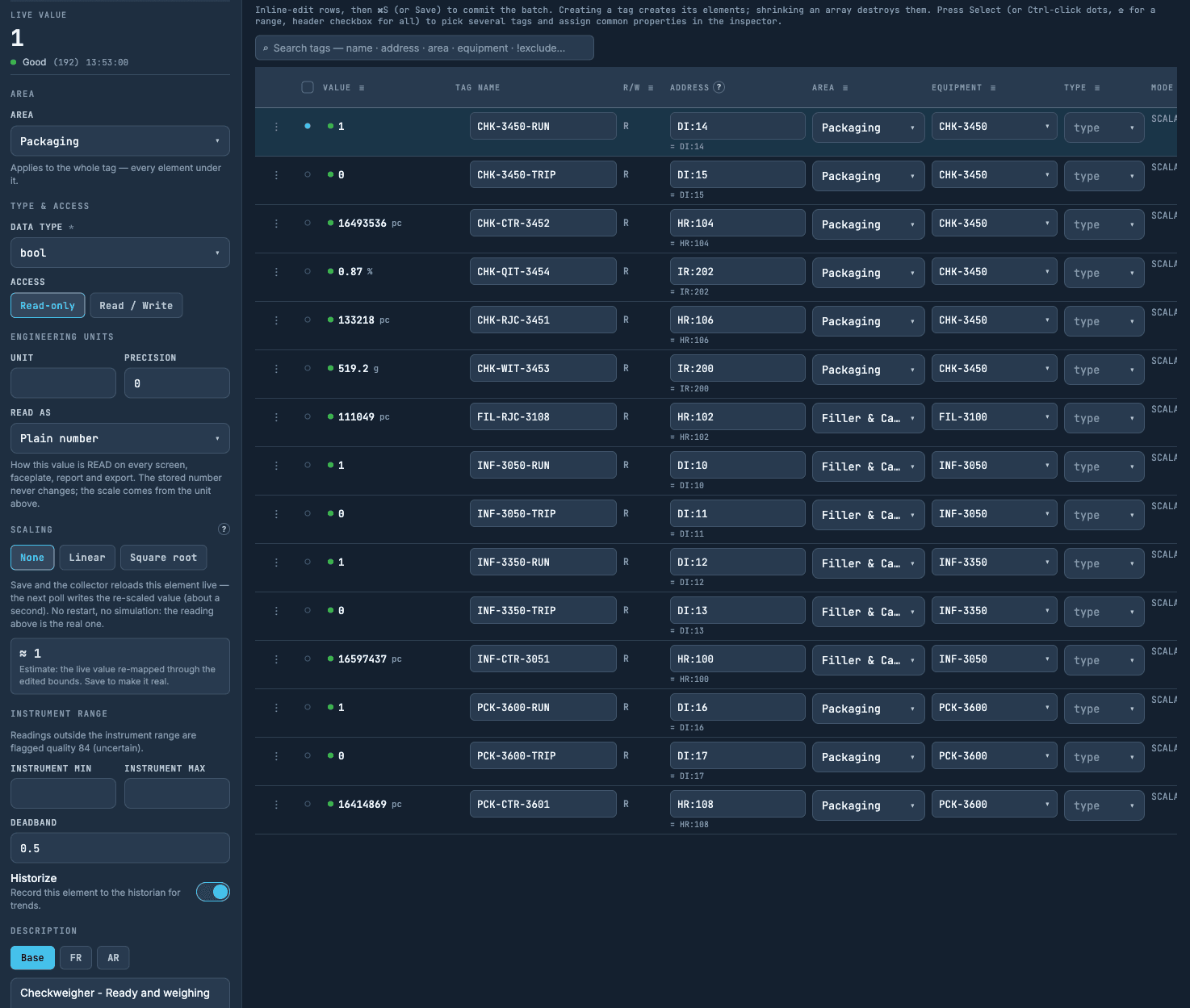
  3. Signal settings beside the live readingChange the bounds, save, and the reading corrects itself on the next poll without leaving the editor.
  4. Write a value from the signal listThe bolt, then arm and confirm: the value goes down the same audited path an operator's button uses, and the reading comes back confirmed.
  5. The binder shows what it reads nowEach signal shows what it reads right now, with its unit, its range and whether it may be written.

Seen in the product

the layers cockpit: every widget on the page with its eye and its switch
one driver's signals with the reading first, and the signal's own settings beside the reading they change

The engineer builds against the running line.

  • Engineers draw in a browser, and nothing is licensed per workstation. A finished line is copied in one press and carried to the next plant as a single portable file.
  • A banner says who else is on the page, and it never blocks anyone. A save made against a page that has moved on is refused rather than quietly merged.
  • The eye hides a layer for the engineer alone; the operator's page keeps everything until a switch or a plant condition takes it off.
  • The page designer has two modes, and the second one is the operator's own screen. The rest of the editor works the same way: the signal list, the binder and the trend all read the running line while the work is still being done.
  • No restart, no simulation: the reading above is the real one.
  • Preview dresses the buttons for the role you choose, and the database still judges the person signed in.
07/10

TimeLens · replay

Rewind any screen.

TimeLens · Beverage Line 7 · replay
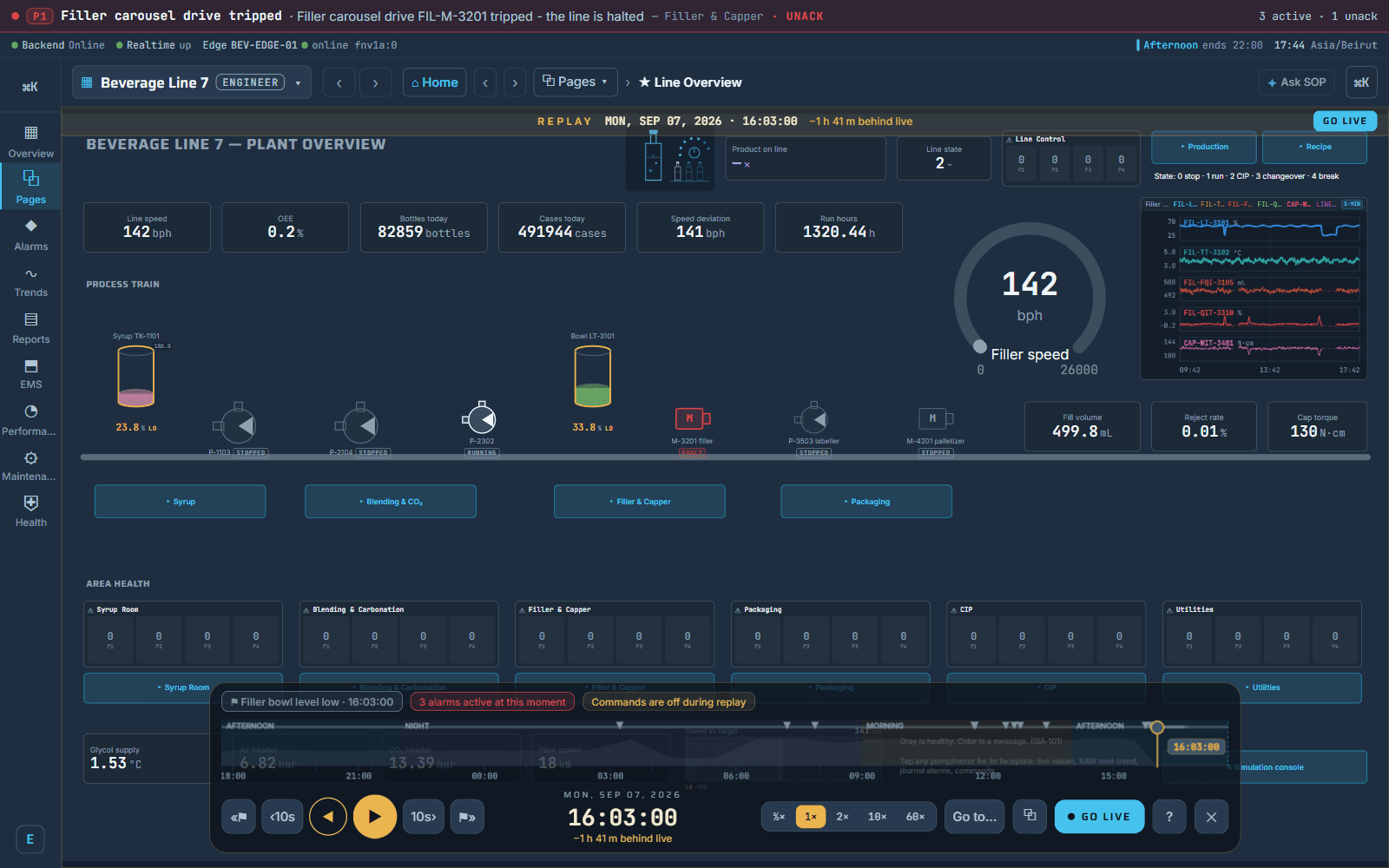
the same synoptic replayed from the history — the gold dress, the alarms active at that moment, commands off
  1. Rewind any screenThe screen as it stood, the alarm flags on the timeline, commands off, the day's timeline, the speeds, go to a moment, back to live.
  2. A moment linkPastes into a message; a colleague opens the same second on the same screen.
  3. From an alarm, one pressOne press from the alarm to that page at that moment.
  4. It can never be mistaken for liveThe replayed screen wears gold and its commands are off.

Seen in the product

the transport bar under any replayed page: the alarms active at that moment, commands off, the day's timeline, the speeds, go to a moment, back to live
and where a replay usually starts: View in TimeLens, on the alarm's own card

Two lenses: one over time, one over the tags.

  • The operator's question is what happened at a moment. The engineer's question is what a signal touches before it is changed. Each has a lens, and each answers from the one database.
  • Any page replays from the historian: back and forward, alarm to alarm, or straight to a moment. The replayed screen wears gold and its commands are off, so it can never be mistaken for live.
  • A moment link pastes into a message and a colleague opens the same second on the same screen. From an alarm row, one press lands on the screen as it was when the alarm raised.
08/10

Tag Lens

One signal, followed through every module

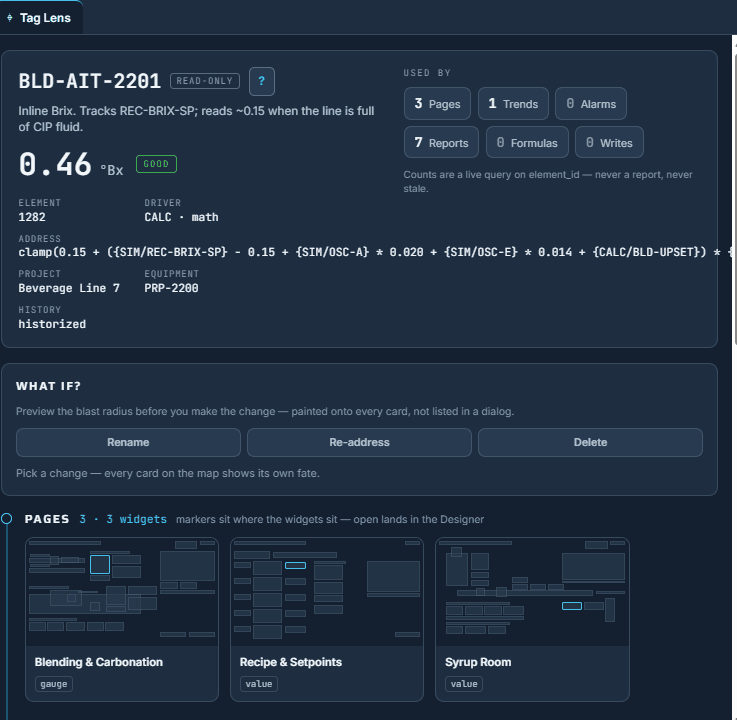
Tag Lens · BLD-AIT-2201 · the card
one signal: its identity card and live value, then everything that uses it
  1. One signal, every moduleEvery page, trend, alarm, report block, formula and condition that uses it.
  2. What if, before a renameEach page, trend, alarm, report block and formula shows its own fate first.
  3. The health sweepSignals polled and shown nowhere, bindings pointing at nothing, formulas that no longer read.
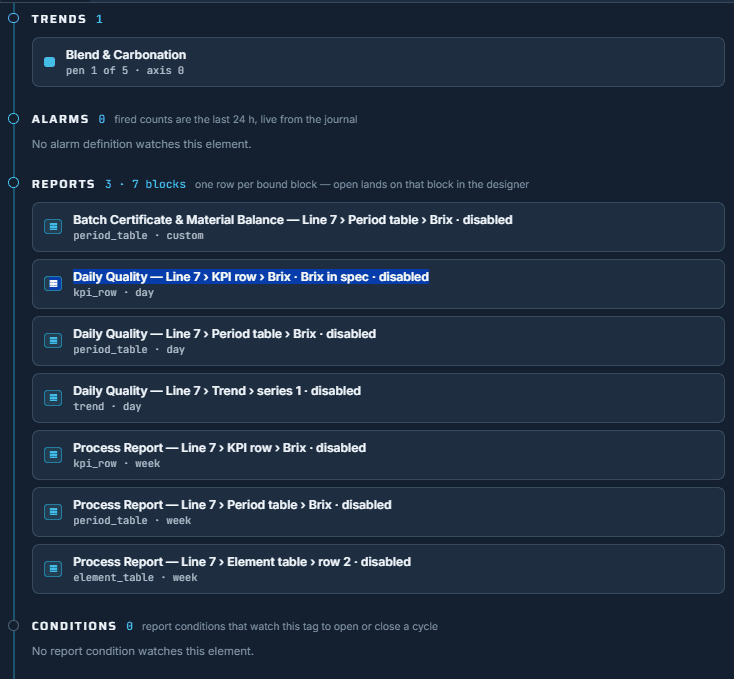
  4. The thread into reports and conditionsA signal cannot disappear from a printed sheet by surprise.

Seen in the product

the thread continued: trends, alarms, report blocks, conditions
the health page: the data path and its hops, for a whole line

One signal, followed through every module.

  • We know of no other platform that follows one tag through every module of the plant. A migration is a thousand signals moved; here each one shows what it touches before it is touched.
  • The engineer's question is what a signal touches before it is changed — and it is answered from the one database, not from a spreadsheet of bindings.
09/10

Emergency HMI

The edge runs the line. The server only receives.

the console · Beverage Line 7 · emergency access
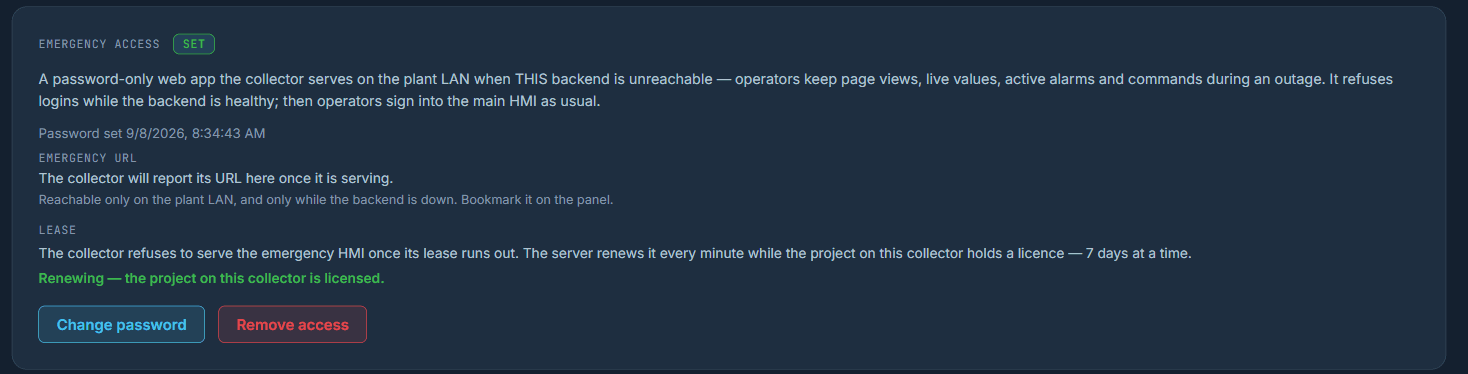
the edge's own emergency access, armed once by the administrator and refused while the server is healthy
the emergency HMI · the two routes
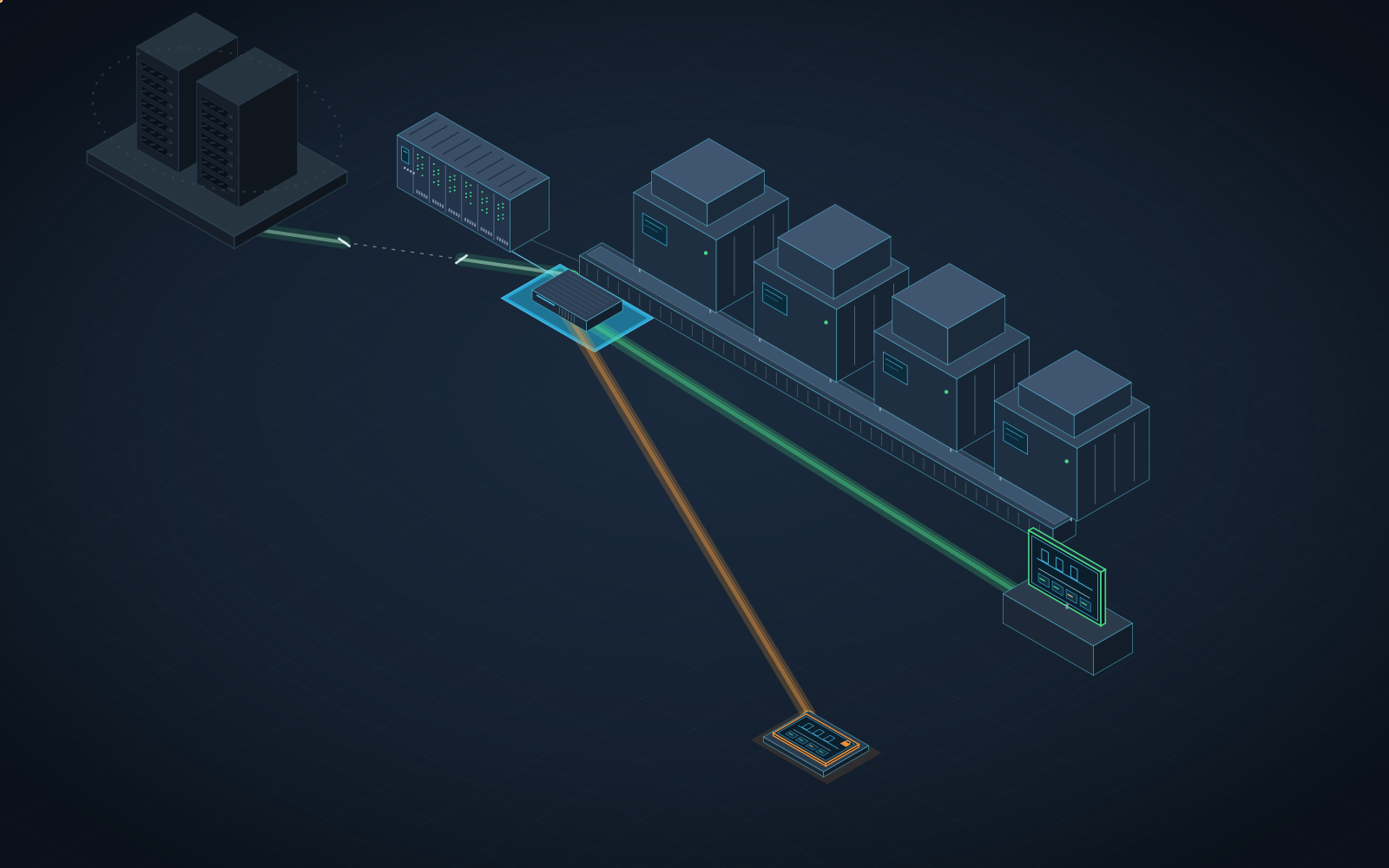
A drawing: the plant's controllers, the collector and the screens on the LAN; the route through the server in green while it runs, the collector's own route to the screens in orange while the server is cut
drawn: the normal route in green - the server, the collector, the pages on the LAN - and the emergency route in orange when the server is unreachable: the collector serves the plant's own pages until the server returns
  1. The edge that holds the lineOne executable beside the controller polls the devices, judges the alarms, holds the history and writes the operator's commands back.
  2. The drivers it speaksSOP supports all major drivers — Modbus, OPC DA, Siemens S7 and OPC UA among them.
  3. Buffer and back-fillCut the network and the readings wait on the edge's own disk, then fill the gap in.
  4. A second edge on the same devicesWhere a line cannot afford to lose its edge, a second one stands on the same devices and takes over.
  5. The server, on the substrate you chooseFrom scripts, in a single session, on plain hardware in your own plant, air gapped if your rules say so, or on a cloud backbone; the plant and its history on the same box.
  6. Duty and standby, one address that movesTwo identical servers, one address the plant dials; a planned handover refuses unless both are in step, and a standby that cannot see the plant stands down. The standby is part of the platform, not a second purchase.
  7. Two servers for the whole plantNot a standby bought for every engine: one duty, one standby, one address, for every line and every edge.
  8. The plant's own pages, served by the edgeIf the server cannot be reached, the edge serves the pages the operators trained on: the same drawing, the same symbols, the same commands, live values and standing alarms.
  9. It refuses a login while the server is healthyThe emergency access opens only while the server is unreachable, and closes when it returns.

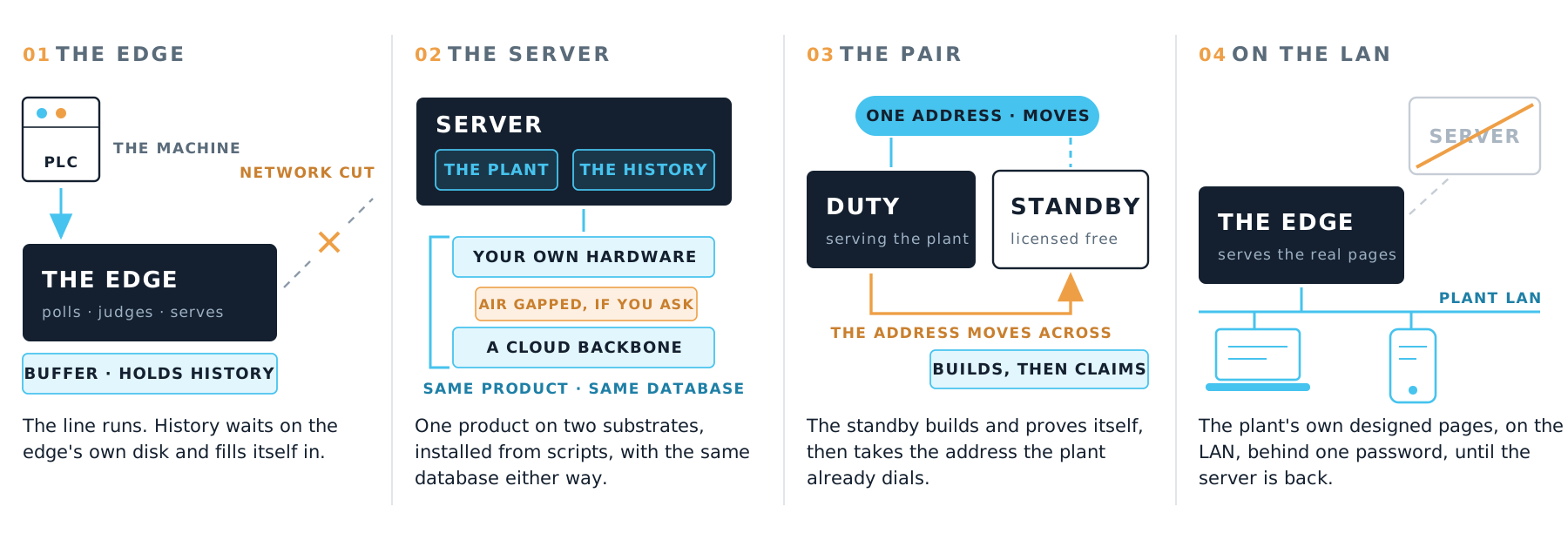
the four ways the line stays up: the edge · the server · the pair · the plant's own pages on the LAN

The edgeholds the line · buffers · back-fills itself
The serverholds the plant · your hardware, air-gapped, or a cloud backbone
The pairtwo servers for the whole plant · one address moves
The edge againthe same pages, served directly when both servers are unreachable

Availability is the architecture, not an option.

  • One executable sits beside the controller and does the work the line depends on: it polls the devices, judges the alarms, holds the history and writes the operator's commands back. The server in the middle only receives, which is why a server that stops is an inconvenience and never an outage.
  • A server that stops loses no plant data: it never lived only there. One store, nothing to reconcile. Adding a way to stay up costs a setting, not a licence.
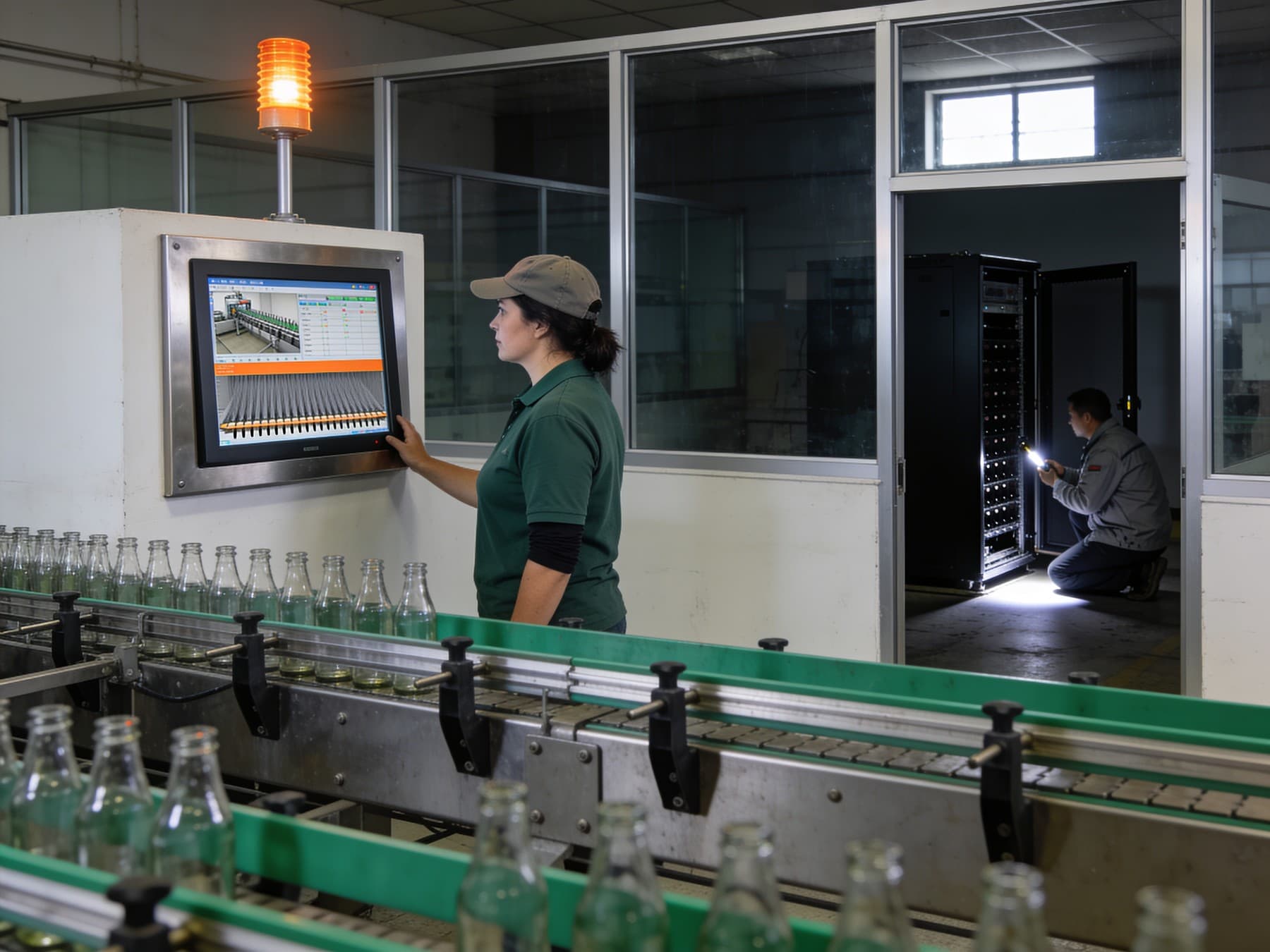
  • The emergency HMI — we know of no other platform that does this. If both servers are unreachable, the operators keep running the plant from the edge itself: no extra HMI panel, no second application — the same SCADA pages the server designed are already stored on the edge, and the edge serves them directly, with the same symbols, the same commands, live values and standing alarms, until the centre is back.
  • Not one of these four changes a screen anybody uses: the edge buffers on every install, and the pair and the emergency password are set once by the administrator.
10/10

Rights and the record

What a user may not see never reaches them.

the console · the fleet · the audit journal
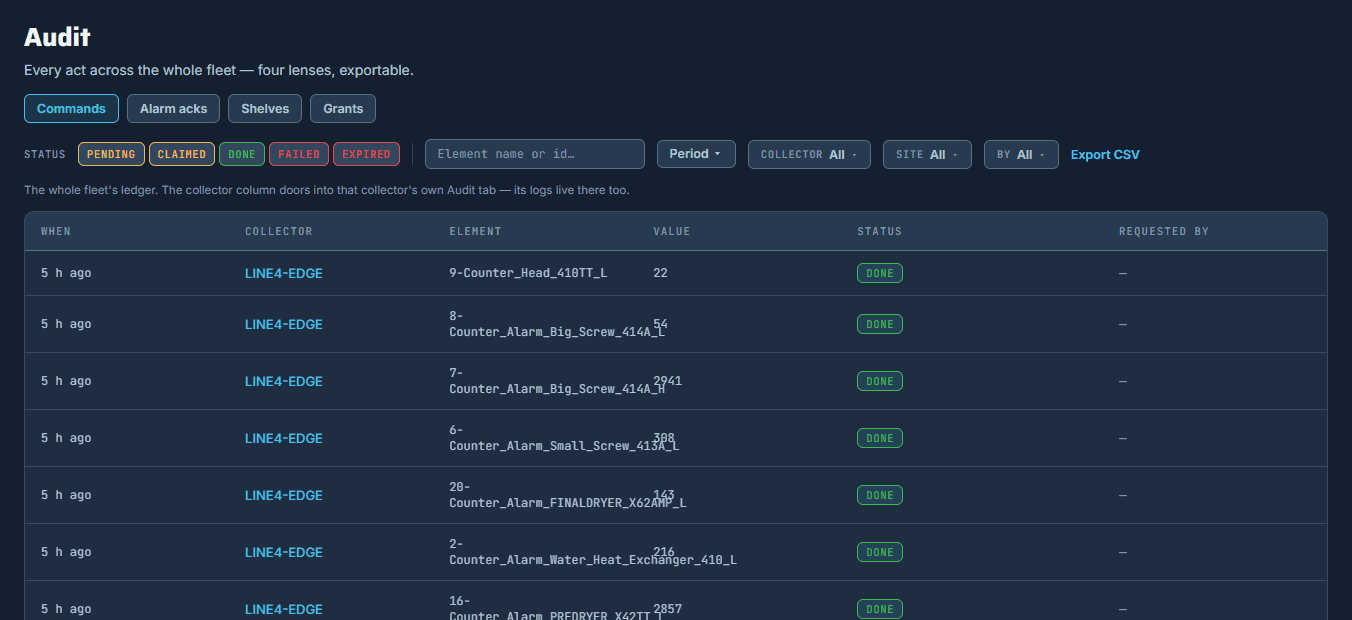
the audit journal across the whole fleet, in four lenses, filtered and exported
  1. Rights in one console, read in the databaseA screen a person may not open is never sent to their browser, their export or their sheet.
  2. The rights ladderSix rungs: the licence · the switch · the role and the scope · the group · the list · the record.
  3. A role on a scopeA contractor runs one line and nothing else; the press is refused in the database anywhere else, not merely greyed out on the screen.
  4. Groups instead of peopleOne list to keep, and a new starter is covered the day they join it.
  5. Can see and open, per pageThe pages leave everyone else's tree, in the control room and on the phone; off the list a page goes away, not grey.
  6. Can send command, per signalEverybody keeps watching the valve, and nobody else can move it.
  7. Module access, per lineThe module leaves everyone else's menu on that line, and stays as it was on the others.
  8. Disable the accountThe next sign in is refused, and the record of what they did stays.
  9. The licence and the module switchA module nobody bought never appears, and a line it is off on never shows it.
  10. The audit journalEvery command, acknowledgement, shelving and grant across the fleet, each with its moment, in four lenses, narrowed and exported.

the rights ladder: six rungs, each with the console word it is set in

The licencewhat this server owns · Licensing
The switchwhich lines show it · Licensing
The role and the scopewhat a person may do, and where · Users & Access
The groupthe crew a list names instead of each person · Groups
The listthis page, this signal, this module · Can see & open · Can send command
The recordwhat was actually done · Audit

Seen in the product

one page narrowed to one crew: for everyone else it is gone, not greyed
who may use one module on one line: a crew, or everyone

What a user may not see never reaches them.

  • Rights are set in one console and decided in the database, so a screen a person may not open is never sent to their browser, their export or their sheet. The same console reaches from a whole site down to one screen, one signal and one module, and it keeps the record of every act that follows.
  • Off a list a page does not go grey for other people, it goes away: it leaves the operator's page browser, it leaves the editor's tree, and every button that led to it goes with it. A global administrator is the one who can hand it back.
  • A right set in a client menu can only withhold the drawing, because the data has already travelled. Here the rule that hides a screen is the same rule that filters the export and the printed sheet, because there is one database under all three: what a person may not see is never sent.
  • And the record the auditor reads is the screen's own rows: the numbers on the sheet are the same rows the operator was watching, so the tile and the paper cannot disagree.